If you’ve ever sat at a kitchen table at 9pm trying to update advancement records while your spouse asks why this is taking so long, you already know the problem this review is about. Scout leaders are volunteers, not IT admins. But for the better part of a decade, the software meant to help us run our troops has been clunky, dated, and built for a world that doesn’t really exist anymore. The world before smartphones.
I earned my Eagle back in 2014, and even then my troop was juggling a stack of systems just to keep advancement, finances, and campouts straight. I hear about this same problem constantly from leaders who follow ScoutSmarts. Scoutbook works, sort of, but it feels like a website from 2008 that got duct-taped to a phone. Every other piece of the puzzle (RSVPs, group chats, photos, the troop website) lives in a different app, a different inbox, or a different shared drive that nobody can find.
I’ve been looking for a tool that actually solves this for years. I hadn’t seen one come close until I came across Troop Campfire. After spending several weeks with the platform and talking with the founder directly, I’m confident this is the closest thing to a real answer the Scouting world has right now. Here’s my full review.
Note: If you’re trying to figure out which Scout management tool is right for your unit overall, start with myfull comparison of the best Scout troop management software in 2026. This review is the deep dive on Troop Campfire specifically, which was my top pick across that comparison.
What Troop Campfire Actually Is: The All-in-one Scout Organization Platform
Troop Campfire is an all-in-one Scout organization management platform created by Mike Marcucio, the Committee Chairman for Troop 41 who got tired of stitching together half a dozen apps to run his unit. It works for Scouts BSA troops, Cub Scout packs, and Venturing crews. The whole platform was built mobile-first, meaning everything you can do on the web you can also do on your phone, with a native iOS and Android app.
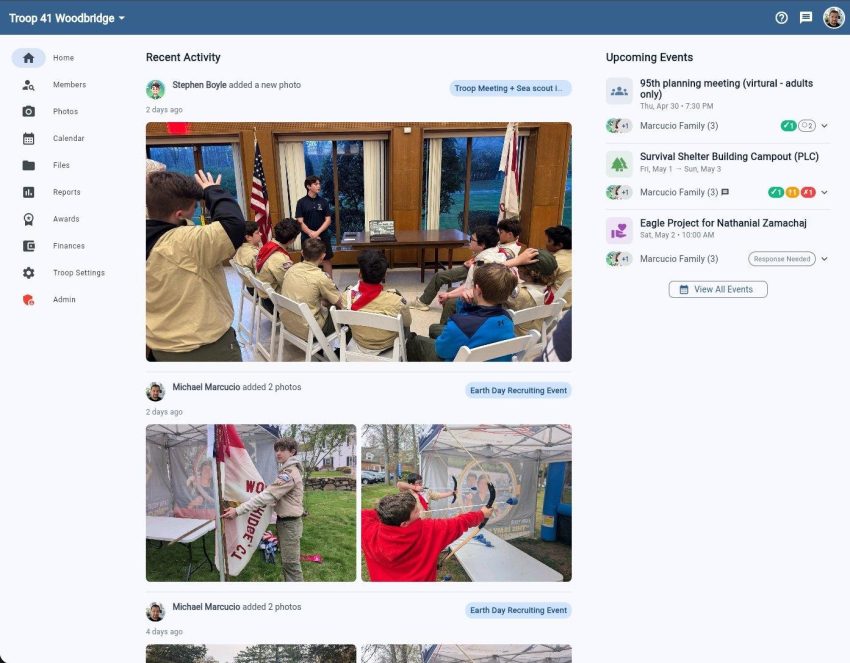
The Troop Campfire home dashboard: recent troop activity, photos, and upcoming events in one place.
In one platform, it covers:
Event planning, RSVPs, and reminders
Member directory with patrol assignments and family contacts
Real-time troop and patrol messaging
Photo galleries organized by event
Rank and merit badge tracking
A public troop website that auto-syncs with your calendar
Scoutbook import and ongoing sync, so you stay compatible with Internet Advancement 2.0
Role-based permissions for leaders, parents, and Scouts, with Youth Protection compliance baked in
The pricing is straightforward. There’s a free tier (called Basic Troop) that includes unlimited members, calendar, RSVPs, messaging, advancement tracking, and a one-time Scoutbook import. The paid tier (Full Troop) is $125 per year for the entire unit, which adds the public website, photo galleries, file storage, ongoing automatic Scoutbook sync, and AI-assisted event planning. There’s a 14-day free trial with no credit card required, and a 30-day money-back guarantee.
Heads up: Troop Campfire gave ScoutSmarts readers an exclusive 15% off the Full Troop plan! Use code ScoutSmarts15 at checkout.
For context, that pricing is right in line with the rest of the market. TroopTrack runs $99 a year, TroopWebHost is $109. Troop Campfire is the only one in that price range that’s mobile-first and syncs automatically with Scoutbook.
The Big Differentiator: It’s Built For Your Phone
It’s easy to dismiss “mobile-first” as just a bonus feature, but the practical difference is real, and it shows up in small moments that compound over years of running a troop.
On a typical campout weekend, a troop might generate dozens of small admin tasks. RSVPs that need confirming. Gear lists that need updating. Two parents asking about pickup times. A photo someone wants shared with the troop. Three merit badge requirements that got finished around the campfire. A permission slip somebody forgot to submit.
None of these tasks are big on their own. But trying to handle them through Scoutbook plus email plus a group text plus a shared folder is what makes leaders quietly burn out. Fragmentation is what makes the work of running a troop that much harder.
With Troop Campfire on your phone, the campout has its own page. RSVPs live there. The chat about packing lists lives there. The advancement updates from Saturday’s hike also live there, and so does the photo gallery that everyone can contribute to. And when you get home Sunday night, there’s no “now I need to enter all this into Scoutbook” panic, because it’s already synced.
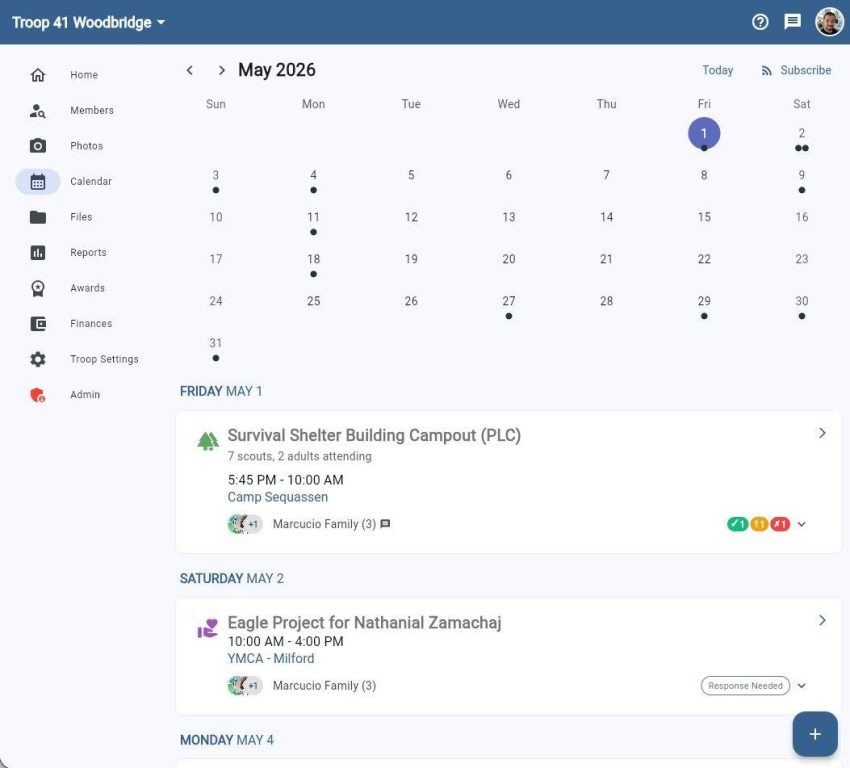
The calendar view: every event has its own page with RSVPs, location, and chat. No more chasing parents in three different group texts.
The benefit is straightforward. Less time on admin, more time focusing on Scouting. 🙂
The Scoutbook Sync Is The Real Win
Here’s the part I think a lot of leaders will care about most: you don’t have to choose between Troop Campfire and Scouting America’s official systems. You don’t have to migrate everything in one painful weekend or abandon Scoutbook!
Troop Campfire imports your existing Scoutbook data with one click, and on the Full Troop plan, it keeps syncing automatically so your advancement records stay in lockstep with Internet Advancement 2.0. You manage your day-to-day in a modern interface, and the official records flow through to Scouting America like they always have.
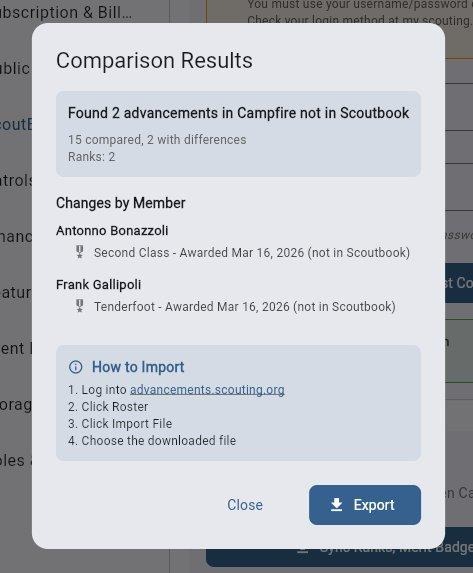
The Scoutbook sync dialog: Troop Campfire flags any advancements in your unit that aren’t in Scoutbook yet, then exports a file you can upload to Internet Advancement 2.0.
This is what separates Troop Campfire from the various ad hoc workarounds I’ve seen leaders try over the years: A separate website here or a shared Google Drive that nobody updates. Those tools all create a fragmented system where the official records and reality drift apart. Troop Campfire keeps them in one place.
That alone is the reason I’d point a Scoutmaster toward it.
Why It Gets Mt Thumbs Up: The Founder Is An Active Part Of His Troop
One of the things I’ve come to appreciate about Troop Campfire is that it wasn’t built by a software company that decided to enter the Scouting market. It was built by Mike Marcucio, who is still actively serving as the Committee Chairman for Troop 41. He started the project to solve his own frustrations, and the troops he serves are still using the platform every day.
Here’s how Mike described the origin story to me directly:
“As a leader for Troop 41, I built Troop Campfire to solve my own frustrations. We were juggling multiple outdated systems just to keep track of advancements, finances, and campouts. Having everything consolidated in a modern, mobile-first app has given our volunteers hours of their time back, letting us focus on the scouts instead of the admin work.”
– Mike Marcucio, founder of Troop Campfire and Committee Chairman at Troop 41
Mike also told me his platform has helped over 100 troops since their public launch in early 2026. That’s a small number compared to Scoutbook’s footprint, but it’s strong early traction for a product this young, and it explains the pace of feature releases (they ship updates roughly monthly).
Who I Think Would Get The Most Out Of It
After spending real time with the platform, here’s my honest take on who Troop Campfire is the right fit for. These aren’t the only kinds of units that would benefit, but they’re the four I’d point toward it first.
Smaller troops and packs running on a few volunteers
If your unit has three committed adults doing the work of seven, the time savings here are the biggest win. Consolidating finances, the public website, advancements, merit badges, and Scoutbook syncing into one app is hours of your week back. This is the exact use case Mike built the product for.
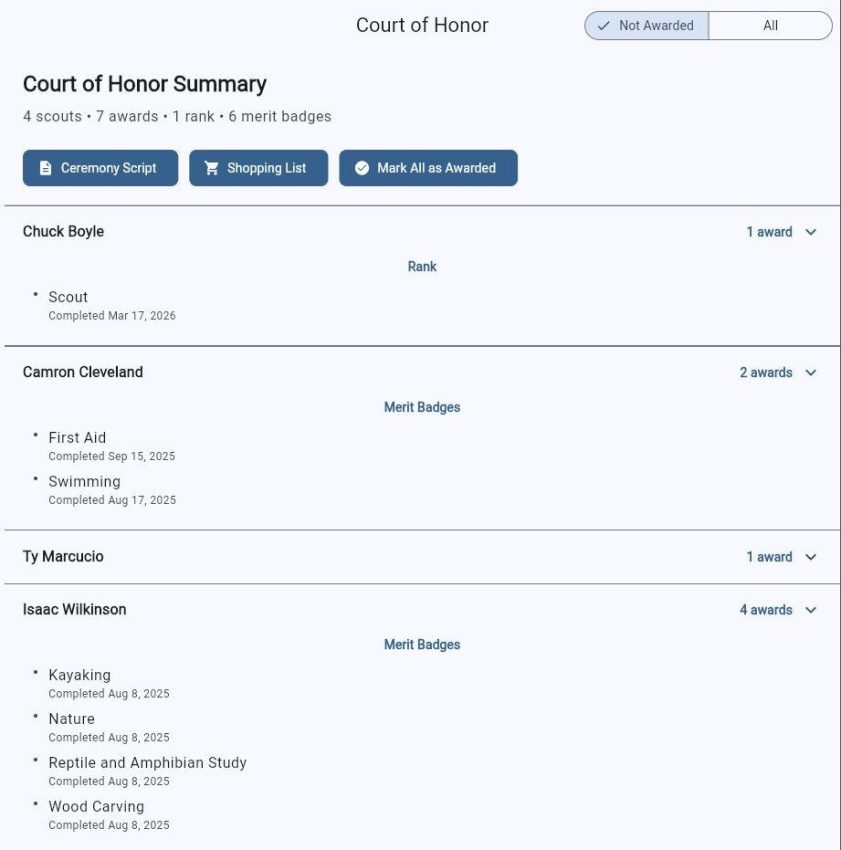
Court of Honor summary view: everything your advancement chair needs to prep a ceremony, including a generated ceremony script and shopping list for the Scout shop.
Troops frustrated with how dated Scoutbook feels on a phone
If your leaders or parents complain about Scoutbook’s interface, or worse, just stop logging into it, that’s a sign your tooling is leaking volunteer effort. A modern interface isn’t a nice-to-have for volunteer-run organizations, it’s the difference between data that’s current and data that’s always six weeks behind.
Cub Scout packs that need a public-facing website but don’t have a webmaster
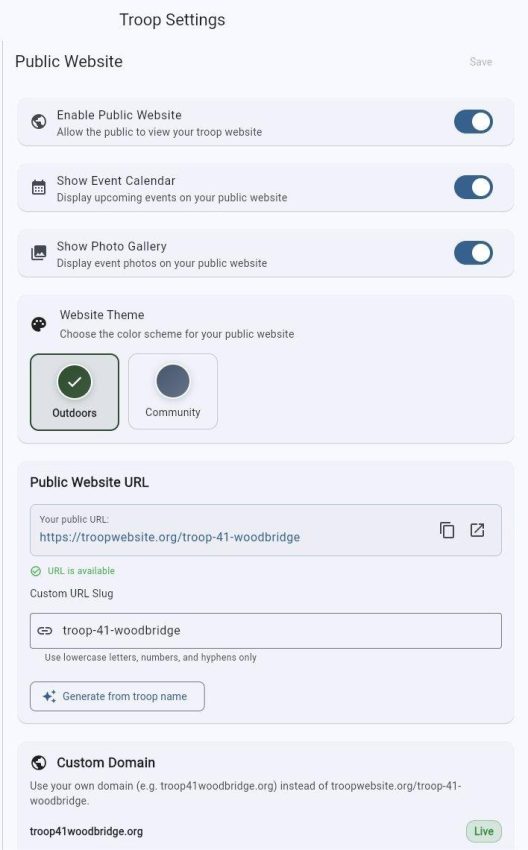
The auto-generated public troop website is one of the more underrated features. It pulls from your Troop Campfire data, gives you a clean, professional URL on troopwebsite.org (or your own custom domain on the Full Troop plan), and it’s perfect for sharing at school nights, sign-up events, and roundups. No web developer required. For packs that have been limping along on a Wix site nobody maintains, this is a real upgrade.
Public website setup. Toggle on what families and prospective Scouts can see, pick a theme, optionally bring your own custom domain.
Any unit whose group chat has become unmanageable
If your troop runs on a tangled mess of group texts, parent emails, and a Facebook group nobody checks, the integrated messaging here is going to feel like a relief. Patrol-specific chats, event-specific chats, and a single source of truth for announcements. The fact that it’s role-permissioned and Youth Protection compliant is a bonus most troops underestimate.
What I’d Want Leaders To Know Before Switching
In the spirit of being useful instead of just selling something, here’s the honest counterweight. Every product has tradeoffs and Troop Campfire is no exception.
Scoutbook is free, and Troop Campfire’s full feature set isn’t. The free tier covers a lot, but the features most leaders end up wanting (the public website, photo galleries, ongoing Scoutbook sync, file storage) live on the $125 a year plan. For a unit of 30 Scouts and 60 parents, that’s a couple of dollars per family per year, which is a rounding error compared to dues and uniform costs. But it’s not zero, and your committee should know that going in.
ScoutSmarts Reader Discount: 15% Off Troop Campfire Use ScoutSmarts15 at checkout to get 15% off the Full Troop plan ($125/year). Works with the 14-day free trial, so you can test the platform before the code applies.
Migration takes a beat. The Scoutbook import is one click, but you’ll still want to spend an hour or two cleaning up patrol assignments, double-checking advancement records, and adding any data that lives outside Scoutbook (your event calendar, your roster, anything in a shared spreadsheet). Most troops are up and running within an hour, but plan for one focused session.
It’s a young product. Troop Campfire launched publicly in early 2026. Strong early momentum (over 100 troops in a few months) and monthly feature updates, but you are an early adopter. The flip side is that feature requests actually get heard. Mike personally responds to support emails.
The community is still growing. Older platforms like TroopMaster and TroopWebHost have decade-plus user communities with forum threads on every conceivable edge case. Troop Campfire doesn’t have that yet. If you hit an unusual problem, you’ll be working with the support team to solve it, not searching a community forum.
What Real Leaders Are Saying
I asked around and pulled some testimonials from leaders currently using Troop Campfire. The pattern across them is consistent. Leaders who switched describe it as a relief, not just an upgrade.
“Wow, better than all other apps or scouting system!!! Everything in one spot!! Loving its modern simple look. Easy to use, and any bug fixed instantly. So grateful and happy using this. For such a little cost yearly… when a custom build this would be 10s of thousands! This new app did it!!”
–Jeana Bee, Troop Campfire user, 2026
“After struggling with Scoutbook for two years, we switched to Campfire. The difference is night and day. Parents actually use it, and uploading to Internet Advancement is actually easier than before.”
Michael T., Scoutmaster, Scouts BSA Troop 142
“We needed more than just advancement tracking. Campfire gives our Scouts BSA troop everything (calendar, messaging, photos) while still working perfectly with Internet Advancement 2.0 for Scouting America reporting.”
–Sarah L., Committee Chair, Troop 87
“The import from Scoutbook was seamless, and we can still report to Internet Advancement just like before. Best of both worlds for our Scouting America troop!”
David R., Advancement Chair, Scouts BSA Troop 305
What stands out across these is that nobody is describing Troop Campfire as a replacement for Scouting America’s official tools. The brilliant thing Troop Campfire does is that it serves as a layer on top that makes the official tools even more usable.
How To Try It
If you want to give it a try, the best path is to start free and see how it feels. There’s no credit card required for the Basic Troop tier, and you can upgrade to Full Troop later when you’re ready to add the website, photo galleries, and ongoing Scoutbook sync.
If you have a specific question that isn’t answered on their site, Mike or the support team will respond very quickly. That has been my experience and the experience of the leaders I talked to.
Why This Matters
Scouting is supposed to be about Scouts. Hiking, leadership, earning merit badges, building friendships, and that crisp smell of a Saturday morning campout. Not data entry or fixing digital emergencies.
I’ve spent years writing about how to be a better Scout and a better Scout leader, and what I hear often from leaders who follow ScoutSmarts is that the admin work is what kills volunteer momentum.
Troop Campfire is the first product I’ve come across that takes that problem seriously and solves it without forcing you to leave the official Scouting America infrastructure behind. It’s modern, mobile-first, affordable for a unit, and built by someone who is actually running a troop.
If your unit is still juggling Scoutbook plus a website plus a group text plus a Google Drive plus a spreadsheet, give it a try. Even just the free tier will show you what a single, consolidated tool feels like.
Your volunteers will thank you. And so will your Scouts, who’d much rather have a Scoutmaster present at the campfire than one still typing into a laptop in their tent. 😉
A note on this review: I reached out to Troop Campfire because I genuinely believe the product is the best troop tracking tool I’ve come across, and we’ve since started a partnership. I may earn a small commission if you sign up through links or the code above. It doesn’t change what I wrote, and I have no relationship with any of the other platforms mentioned.
I'm constantly writing new content because I believe in Scouts like you! Thanks so much for reading, and for making our world a better place. Until next time, I'm wishing you all the best on your journey to Eagle and beyond!
Artificial Intelligence is one of Scouting America's two newest merit badges, alongside Cybersecurity. Because of it's newness, there isn't even a pamphlet for the Artificial Intelligence badge yet!...
Kindness is the sixth point of the Scout Law. Here's what it actually asks of you, twelve small things you can do at your next troop meeting, what the research says you get out of it, and a 1911...